
RESERVATION

Store Conditions
In some cases, we will require visitors to make a store entry reservation before visiting the store to ease crowding.
Reservations are not required on regular business days.
To make a store entry reservation, you will need a store entry reservation ticket (electronic ticket) on the Jump Navi app.
When store entry reservations are required, we will post an announcement on our official X account.
Please check our official X account for the latest information.
Reservations are not required on regular business days.
To make a store entry reservation, you will need a store entry reservation ticket (electronic ticket) on the Jump Navi app.
When store entry reservations are required, we will post an announcement on our official X account.
Please check our official X account for the latest information.
HOW TO RESERVE

STEP 01
Install the Jump Navi app on your smartphone and sign up for a free account.
To make a store entry reservation, you will need to install the Jump Navi app and sign up for a free account.

Jump Navi is an app that provides Jump-related information. The app offers a wide range of content, including news, comics, events, and videos. To learn more about installing the app and signing up for a free account, please refer to the Terms of Use and precautions provided within the app.


Please check here for the recommended operating environment for the app.
•Operation on tablet devices cannot be guaranteed.
Please review the Shueisha Privacy Guidelines before registering.
•Operation on tablet devices cannot be guaranteed.
Please review the Shueisha Privacy Guidelines before registering.
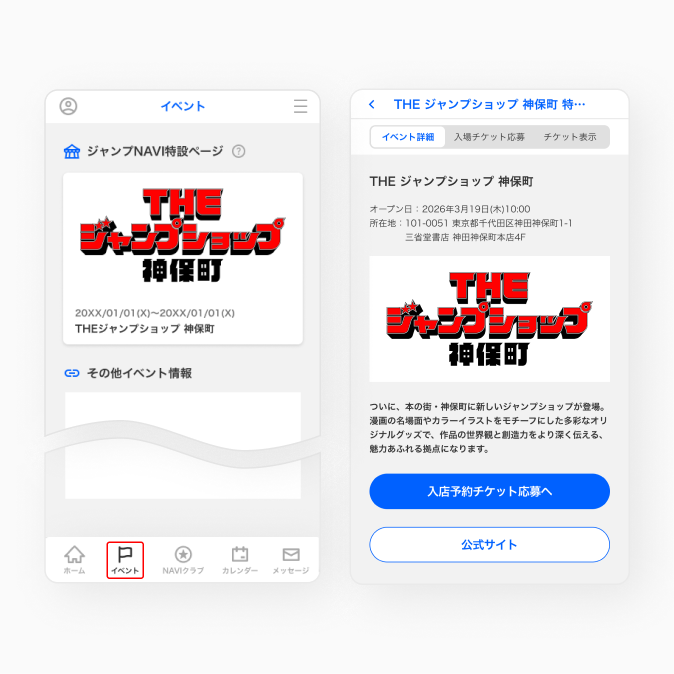
•The Jump Navi interface is still under development. The actual app specifications may differ.
STEP 02
Launch the Jump Navi app and open the special page for The Jump Shop Jimbocho.
Open the menu of the Jump Navi app, navigate to the Events page, and then tap the banner for The Jump Shop Jimbocho to open the special page for The Jump Shop Jimbocho.
Book with Jump NAVI
•The Jump Navi interface is still under development. The actual app specifications may differ.
STEP 03
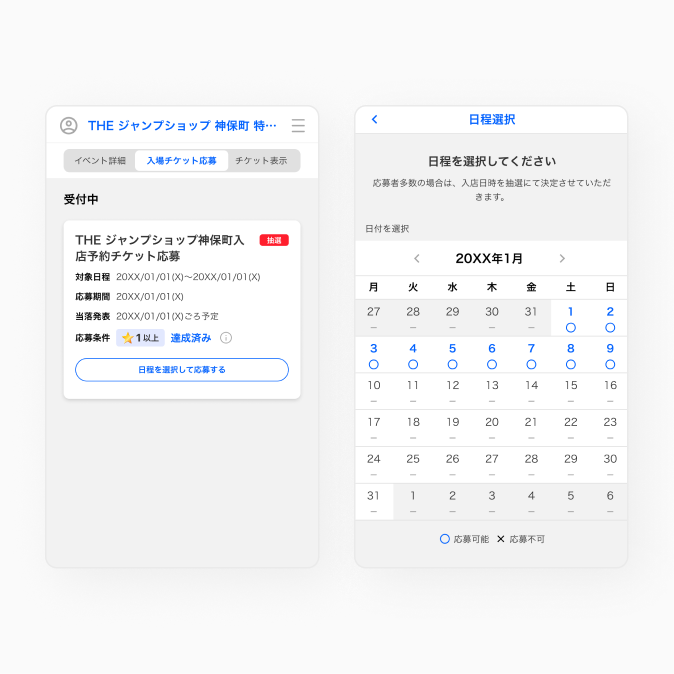
Select the desired date and time for your store entry reservation.
On the special page for The Jump Shop Jimbocho, tap Apply for Store Entry Reservation Ticket, select the desired date and time, and then tap Apply.
•Store entry reservations are offered via a lottery or on a first-come, first-served basis. The application dates for store entry reservations can be checked in the Jump Navi app.
•Applications will not be accepted after the deadline or once first-come, first-served slots are filled.
•If you already have a store entry reservation ticket, you cannot apply for another time slot on the same day.
•Applications will not be accepted after the deadline or once first-come, first-served slots are filled.
•If you already have a store entry reservation ticket, you cannot apply for another time slot on the same day.
•The Jump Navi interface is still under development. The actual app specifications may differ.
STEP 04
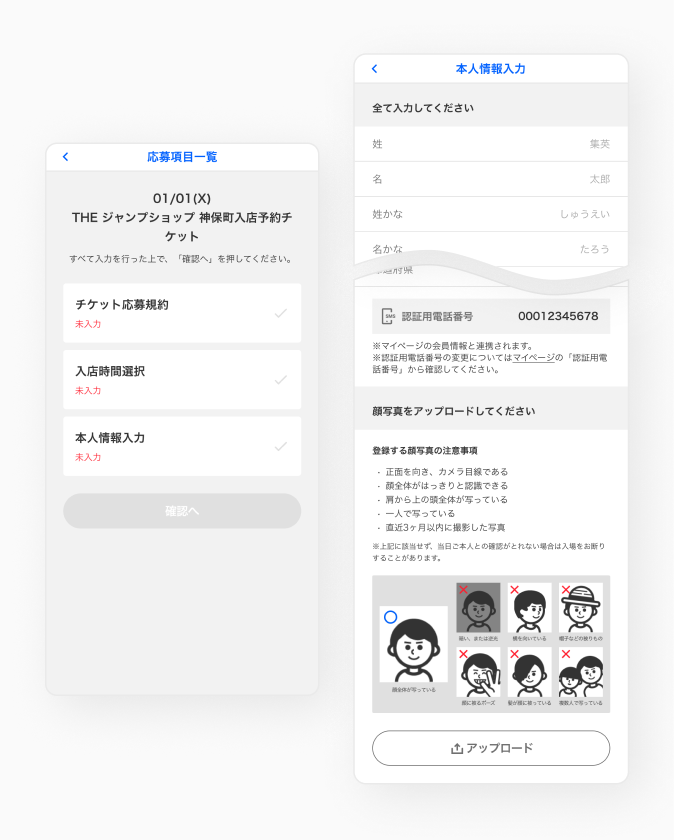
Enter the information required to make a reservation.
Please read the application rules carefully and enter your desired time and personal information. When making a reservation, you will be required to provide personal information, including a photo of your face.
•Store entry reservation tickets are only valid for one use by the person indicated on the ticket.
If the reservation holder needs to bring another person due to unavoidable reasons, such as in the case of an adult guardian (18 or over) accompanying a minor or a caregiver accompanying a person with a physical disability, please notify a staff member at the venue on the day of your visit. In such cases, however, only the owner of the store entry reservation ticket may purchase items.
•Minors may only apply via the Jump Navi app after obtaining parental or guardian consent.
If the reservation holder needs to bring another person due to unavoidable reasons, such as in the case of an adult guardian (18 or over) accompanying a minor or a caregiver accompanying a person with a physical disability, please notify a staff member at the venue on the day of your visit. In such cases, however, only the owner of the store entry reservation ticket may purchase items.
•Minors may only apply via the Jump Navi app after obtaining parental or guardian consent.
•The Jump Navi interface is still under development. The actual app specifications may differ.
STEP 05
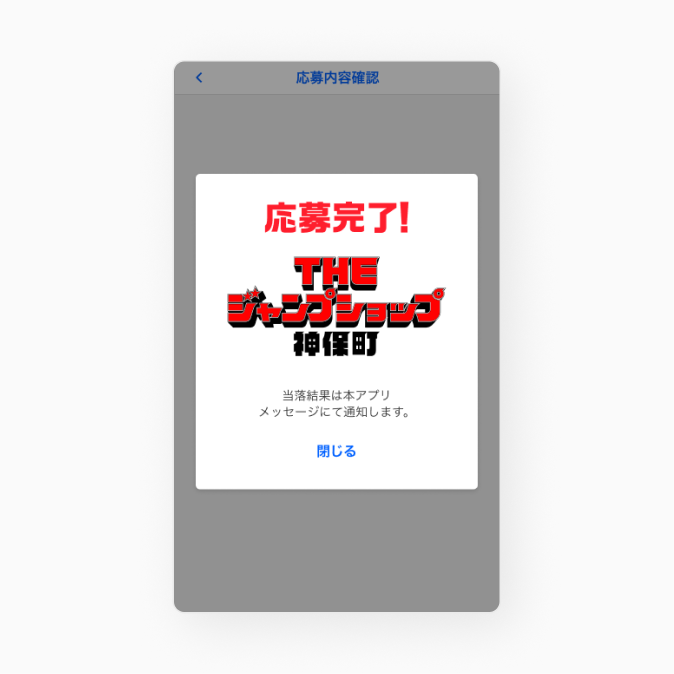
Application Complete
Lottery applicants will be notified of the results via in-app messages in the Jump Navi app.
For both lottery and first-come, first-served applicants, tickets you have obtained can be displayed by tapping Events > The Jump Shop Jimbocho Special Page > Show Ticket.
For both lottery and first-come, first-served applicants, tickets you have obtained can be displayed by tapping Events > The Jump Shop Jimbocho Special Page > Show Ticket.
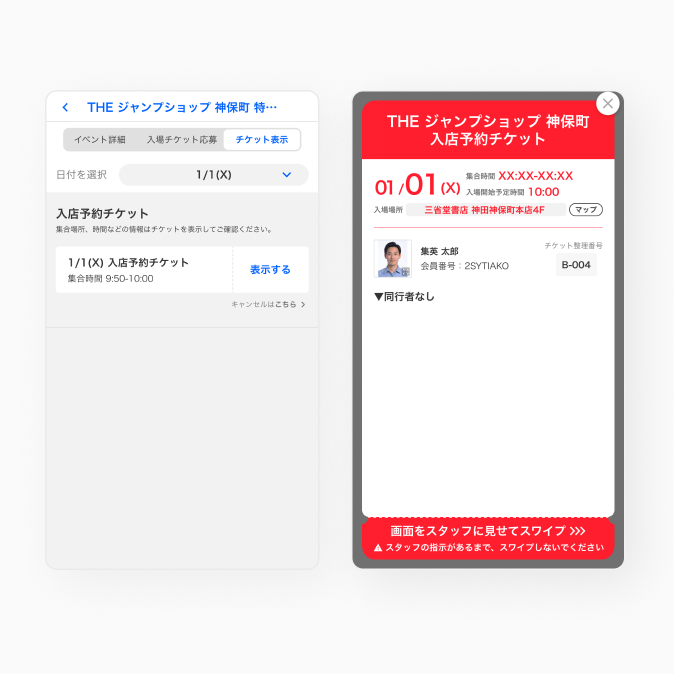
•The Jump Navi interface is still under development. The actual app specifications may differ.
STEP 06
Show your ticket to the staff to enter the store.
When entering the store, please open the Show Ticket page in the Jump Navi app and present your ticket to the staff.
The staff will check whether the details registered in the Jump Navi app, including face photos, are correct.
Entry will not be permitted if there are any discrepancies with the registration details.
The staff will check whether the details registered in the Jump Navi app, including face photos, are correct.
Entry will not be permitted if there are any discrepancies with the registration details.
Notes
Making Store Entry Reservations on the Jump Navi App
- Reservations are offered via a lottery or on a first-come, first-served basis. First-come, first-served applications for each time slot will automatically close once capacity is reached for the relevant time slot. If you are unable to select your desired date and time, please choice another time slot.
- Each lottery (or first-come, first-served) application is limited to one person. You may not apply together with an accompanying person.
- Store entry reservation tickets are only valid for use by the person who made the reservation. Tickets cannot be transferred, and reservation details cannot be changed. In the event you are found to have engaged in fraudulent activity, you will be denied entry or asked to leave the store.
- Store entry reservations are intended to alleviate crowding and prevent the spread of infectious diseases. They do not guarantee that you will be able to purchase products.
- Please be aware of this when visiting the store.
Cancellation and Changes
- The personal information you provide at the time of application will not be changed, even if you edit your profile information in the Jump NAVI app.
- Store entry reservation tickets may be cancelled after they are acquired.
- To cancel, open the Jump Navi app and go to The Jump Shop Jimbocho Special Page > Show Ticket. Store entry reservations can be cancelled from this page.
* Store entry reservations cannot be restored once they have been cancelled. - Application details cannot be changed. To make any changes to a lottery application, please cancel your application and apply again.
- Once a store entry reservation ticket has been issued, personal information and other reservation details cannot be changed under any circumstances.
Late Arrivals and Admission Restrictions
- Depending on the conditions, you may be denied entry if you arrive after your reserved time. We ask that you arrive on time, especially during busy periods. We recommend arriving at the venue at least 10 minutes before the start time.
To make a reservation, click here (Jump NAVI)
reserve